Architekturdiagramme
Visuelle Diagramme zur Duckling-Architektur.
Systemarchitektur – Überblick
flowchart LR
    subgraph FE["Frontend"]
        direction TB
        UI[React-UI] --> Hooks[Hooks]
        Hooks --> Axios[API-Client]
    end

    Axios <-->|REST| API

    subgraph BE["Backend"]
        direction TB
        API[Flask-API] --> SVC[Dienste]
        SVC --> Queue[Auftragswarteschlange]
        Queue --> Doc[Docling]
    end

    Doc --> DB[(SQLite)]
    Doc --> FS[(Dateien)]
Einfache Architektur
graph LR
    A[Webbrowser] --> B[React-Frontend]
    B --> C[Flask-Backend]
    C --> D[Docling-Engine]
    D --> E[(Speicher)]

    style A fill:#3b82f6,color:#fff
    style B fill:#1e3a5f,color:#fff
    style C fill:#14b8a6,color:#fff
    style D fill:#8b5cf6,color:#fff
    style E fill:#f59e0b,color:#fff
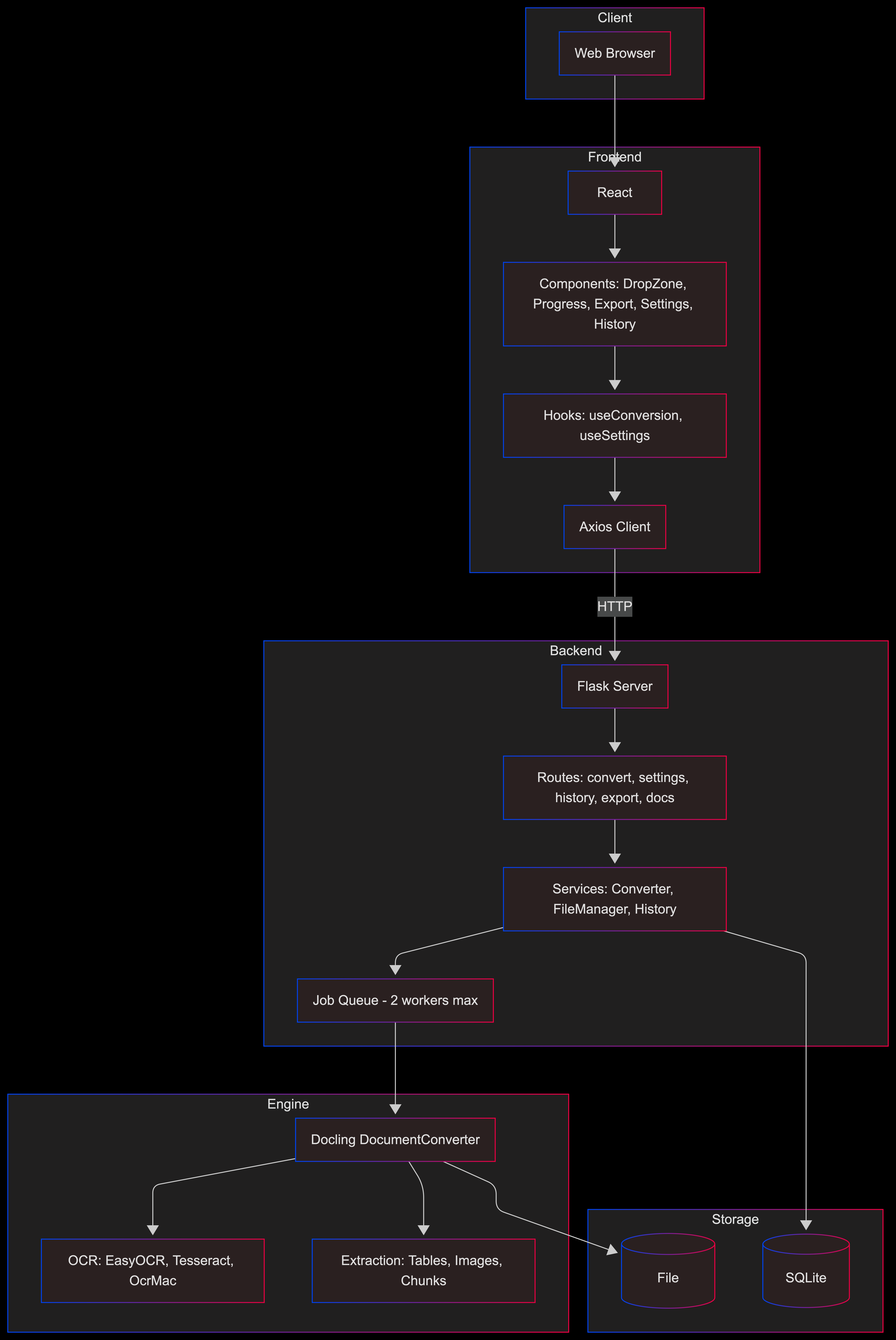
Detaillierte Schichtenansicht
graph TB
    subgraph Client
        Browser[Webbrowser]
    end

    subgraph Frontend
        React[React-App]
        Components[Komponenten: Ablegezone, Fortschritt, Export, Einstellungen, Verlauf]
        Hooks[Hooks: useConversion, useSettings]
        APIClient[Axios-Client]
    end

    subgraph Backend
        Flask[Flask-Server]
        Routes[Routen: convert, settings, history, export, docs]
        Services[Dienste: Converter, FileManager, History]
        JobQueue[Auftragswarteschlange – max. 2 Worker]
    end

    subgraph Engine
        Docling[Docling DocumentConverter]
        OCR[OCR: EasyOCR, Tesseract, OcrMac]
        Extract[Extraktion: Tabellen, Bilder, Chunks]
    end

    subgraph Storage
        SQLite[(SQLite-DB)]
        FileSystem[(Dateisystem)]
    end

    Browser --> React
    React --> Components
    Components --> Hooks
    Hooks --> APIClient
    APIClient -->|HTTP| Flask
    Flask --> Routes
    Routes --> Services
    Services --> JobQueue
    JobQueue --> Docling
    Docling --> OCR
    Docling --> Extract
    Services --> SQLite
    Docling --> FileSystem
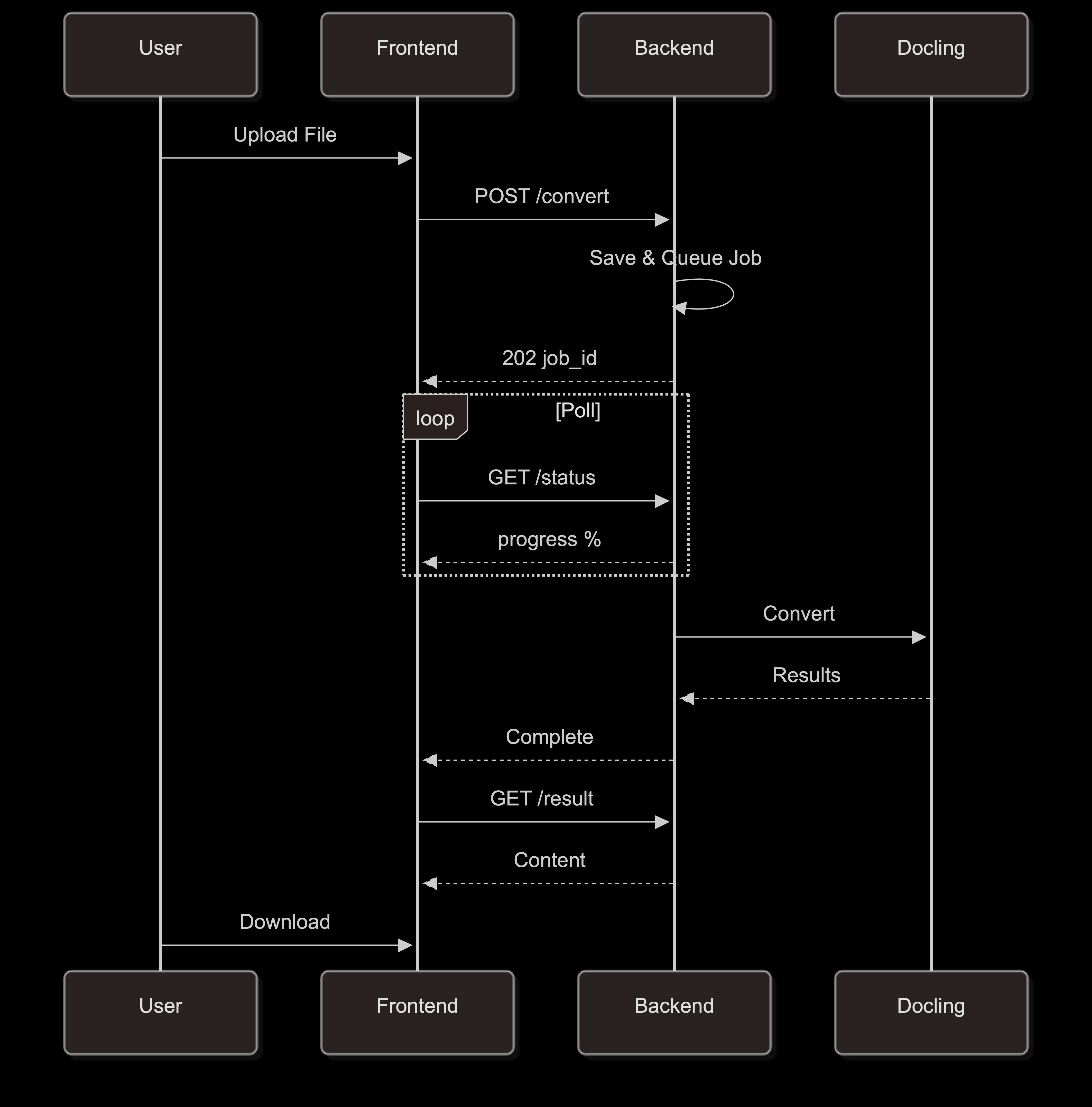
Konvertierungsablauf
sequenceDiagram
    participant U as Benutzer
    participant F as Frontend
    participant B as Backend
    participant D as Docling

    U->>F: Datei hochladen
    F->>B: POST /convert
    B->>B: Speichern & Job einreihen
    B-->>F: 202 job_id

    loop Abfragen
        F->>B: GET /status
        B-->>F: Fortschritt %
    end

    B->>D: Konvertieren
    D-->>B: Ergebnisse
    B-->>F: Abgeschlossen
    F->>B: GET /result
    B-->>F: Inhalt
    U->>F: Herunterladen
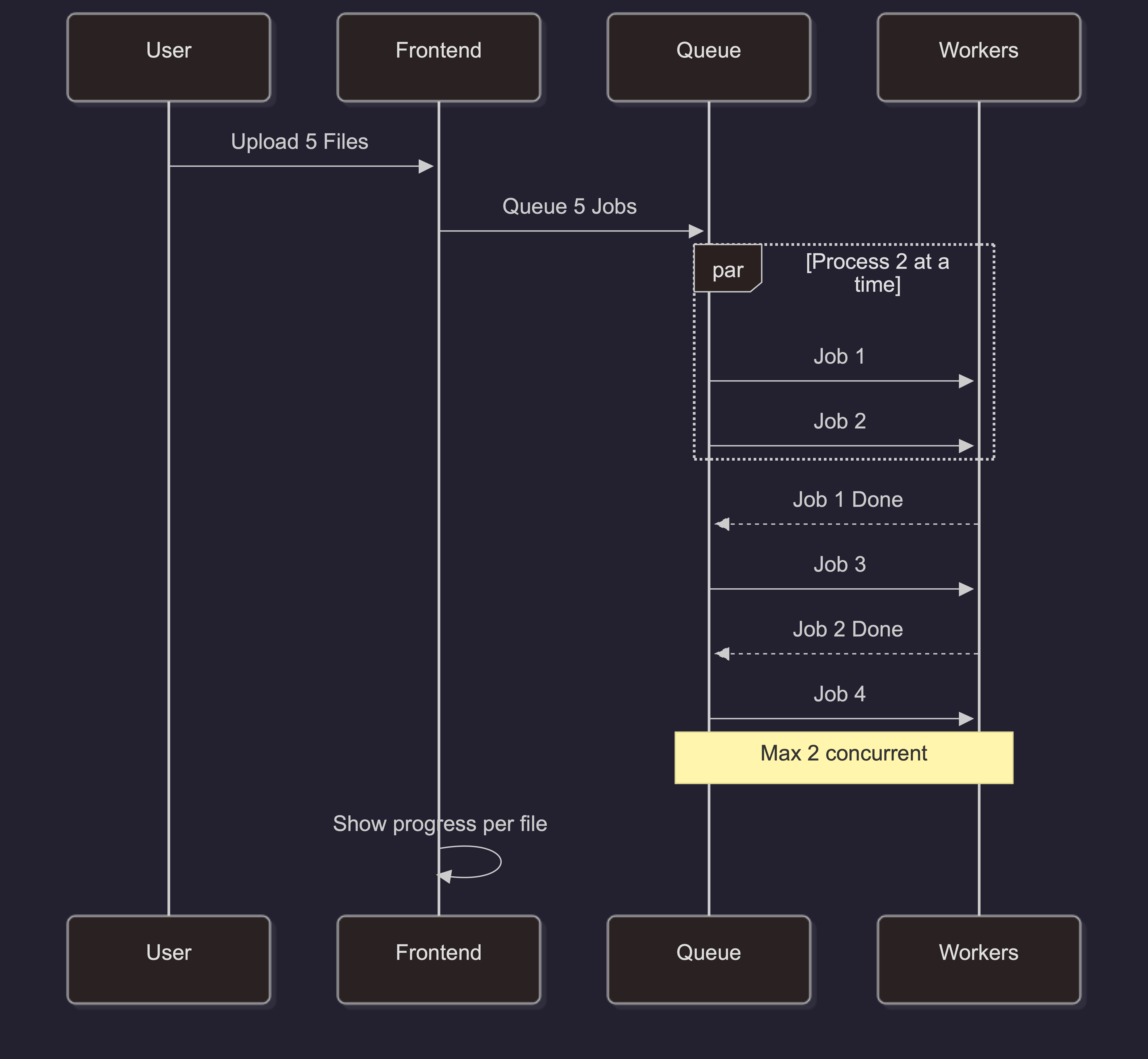
Batch-Verarbeitung
sequenceDiagram
    participant U as Benutzer
    participant F as Frontend
    participant Q as Warteschlange
    participant W as Worker

    U->>F: 5 Dateien hochladen
    F->>Q: 5 Jobs einreihen

    par 2 parallel verarbeiten
        Q->>W: Job 1
        Q->>W: Job 2
    end

    W-->>Q: Job 1 fertig
    Q->>W: Job 3
    W-->>Q: Job 2 fertig
    Q->>W: Job 4

    Note over Q,W: Max. 2 parallel

    F->>F: Fortschritt pro Datei anzeigen
Skalierungsarchitektur
Für produktive Bereitstellungen mit hohem Traffic:
graph LR
    LB[Lastverteiler]

    LB --> B1[Backend 1]
    LB --> B2[Backend 2]
    LB --> B3[Backend 3]

    B1 --> Redis[(Redis Queue)]
    B2 --> Redis
    B3 --> Redis

    B1 --> PG[(PostgreSQL)]
    B2 --> PG
    B3 --> PG

    B1 --> S3[(S3 Storage)]
    B2 --> S3
    B3 --> S3

    style LB fill:#f59e0b,color:#fff
    style Redis fill:#dc2626,color:#fff
    style PG fill:#3b82f6,color:#fff
    style S3 fill:#22c55e,color:#fff
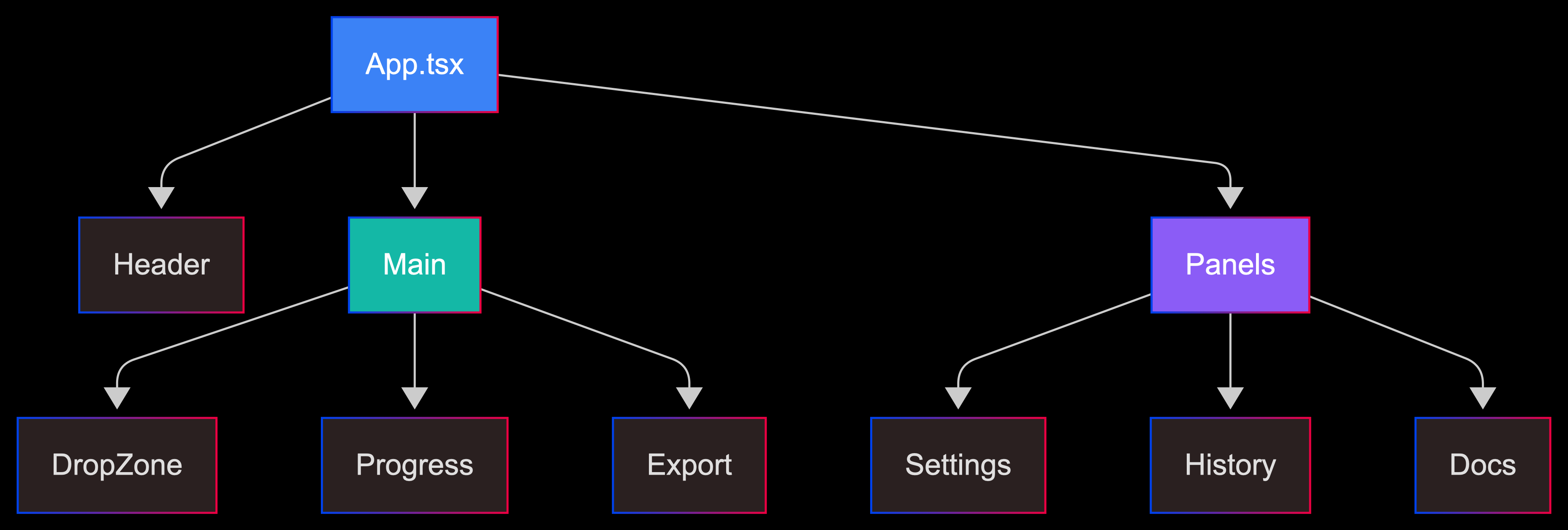
Komponentenbaum
graph TD
    App[App.tsx]

    App --> Header[Kopfzeile]
    App --> Main[Hauptbereich]
    App --> Panels[Seitenbereiche]

    Main --> DropZone[Ablegezone]
    Main --> Progress[Fortschritt]
    Main --> Export[Export]

    Panels --> Settings[Einstellungen]
    Panels --> History[Verlauf]
    Panels --> Docs[Dokumentation]

    style App fill:#3b82f6,color:#fff
    style Main fill:#14b8a6,color:#fff
    style Panels fill:#8b5cf6,color:#fff
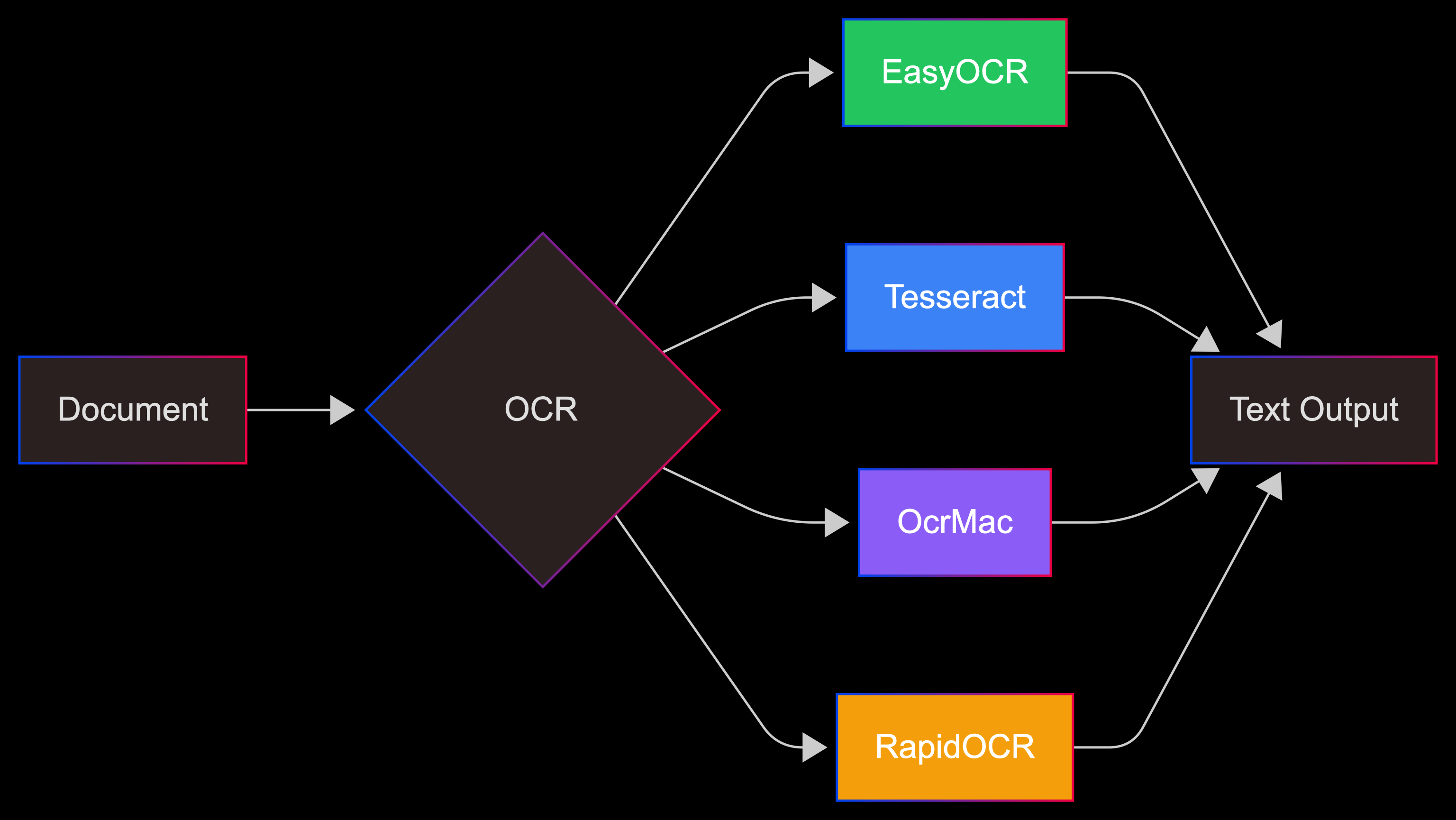
OCR-Optionen
graph LR
    Input[Dokument] --> OCR{OCR-Backend}

    OCR --> Easy[EasyOCR]
    OCR --> Tess[Tesseract]
    OCR --> Mac[OcrMac]
    OCR --> Rapid[RapidOCR]

    Easy --> Out[Textausgabe]
    Tess --> Out
    Mac --> Out
    Rapid --> Out

    style Easy fill:#22c55e,color:#fff
    style Tess fill:#3b82f6,color:#fff
    style Mac fill:#8b5cf6,color:#fff
    style Rapid fill:#f59e0b,color:#fff
Statische Diagrammbilder
Wenn Mermaid nicht gerendert werden kann, stehen statische Bilder bereit: