Schémas d’architecture
Diagrammes visuels de l’architecture Duckling.
Vue d’ensemble de l’architecture système
flowchart LR
    subgraph FE["Frontend"]
        direction TB
        UI[Interface React] --> Hooks[Hooks]
        Hooks --> Axios[Client API]
    end

    Axios <-->|REST| API

    subgraph BE["Backend"]
        direction TB
        API[API Flask] --> SVC[Services]
        SVC --> Queue[File d’attente]
        Queue --> Doc[Docling]
    end

    Doc --> DB[(SQLite)]
    Doc --> FS[(Fichiers)]
Architecture simple
graph LR
    A[Navigateur] --> B[Frontend React]
    B --> C[Backend Flask]
    C --> D[Moteur Docling]
    D --> E[(Stockage)]

    style A fill:#3b82f6,color:#fff
    style B fill:#1e3a5f,color:#fff
    style C fill:#14b8a6,color:#fff
    style D fill:#8b5cf6,color:#fff
    style E fill:#f59e0b,color:#fff
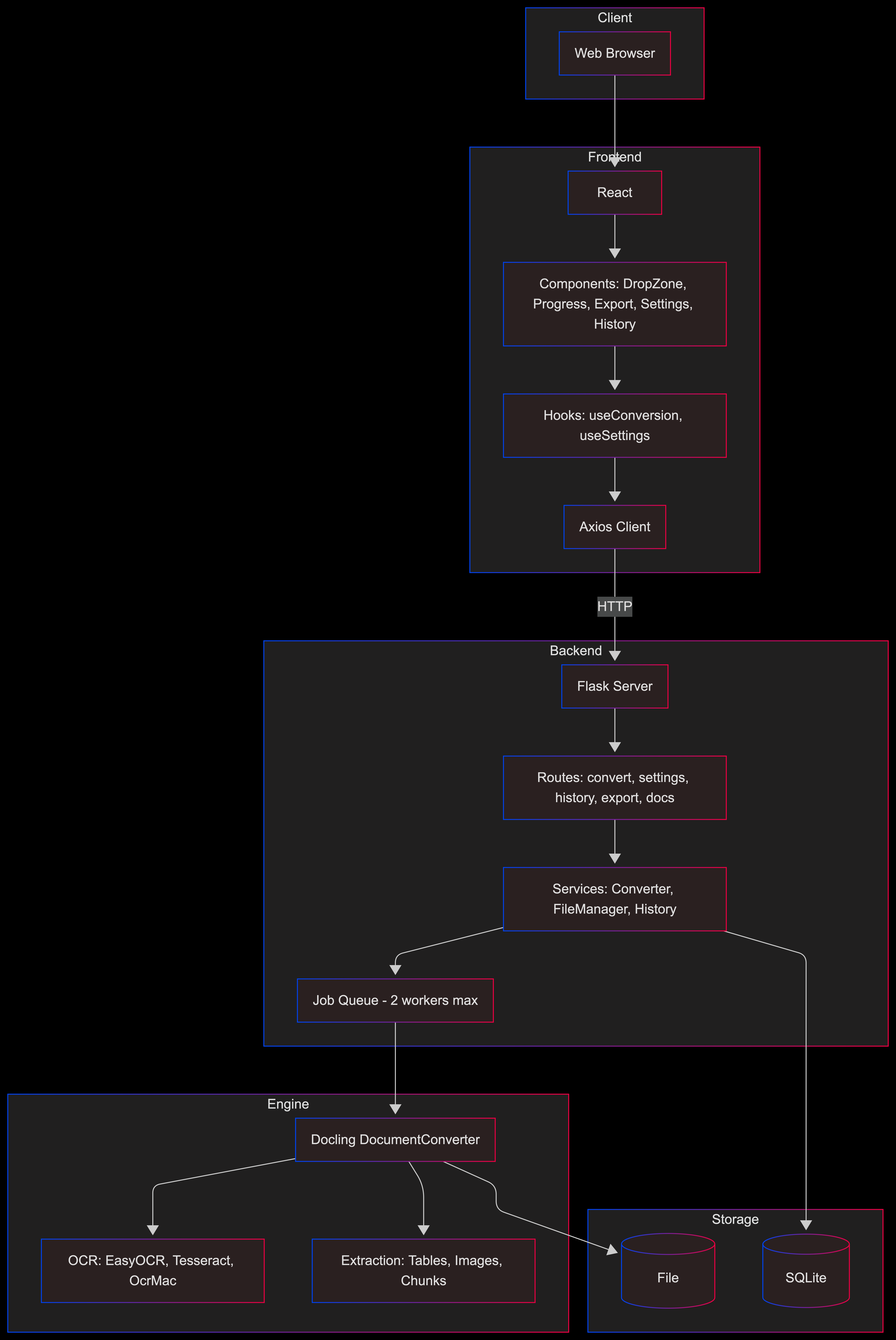
Vue détaillée par couches
graph TB
    subgraph Client
        Browser[Navigateur web]
    end

    subgraph Frontend
        React[Application React]
        Components[Composants : zone de dépôt, progression, export, paramètres, historique]
        Hooks[Hooks : useConversion, useSettings]
        APIClient[Client Axios]
    end

    subgraph Backend
        Flask[Serveur Flask]
        Routes[Routes : convert, settings, history, export, docs]
        Services[Services : Converter, FileManager, History]
        JobQueue[File d’attente – 2 workers max]
    end

    subgraph Engine
        Docling[Docling DocumentConverter]
        OCR[OCR : EasyOCR, Tesseract, OcrMac]
        Extract[Extraction : tableaux, images, fragments]
    end

    subgraph Storage
        SQLite[(Base SQLite)]
        FileSystem[(Système de fichiers)]
    end

    Browser --> React
    React --> Components
    Components --> Hooks
    Hooks --> APIClient
    APIClient -->|HTTP| Flask
    Flask --> Routes
    Routes --> Services
    Services --> JobQueue
    JobQueue --> Docling
    Docling --> OCR
    Docling --> Extract
    Services --> SQLite
    Docling --> FileSystem
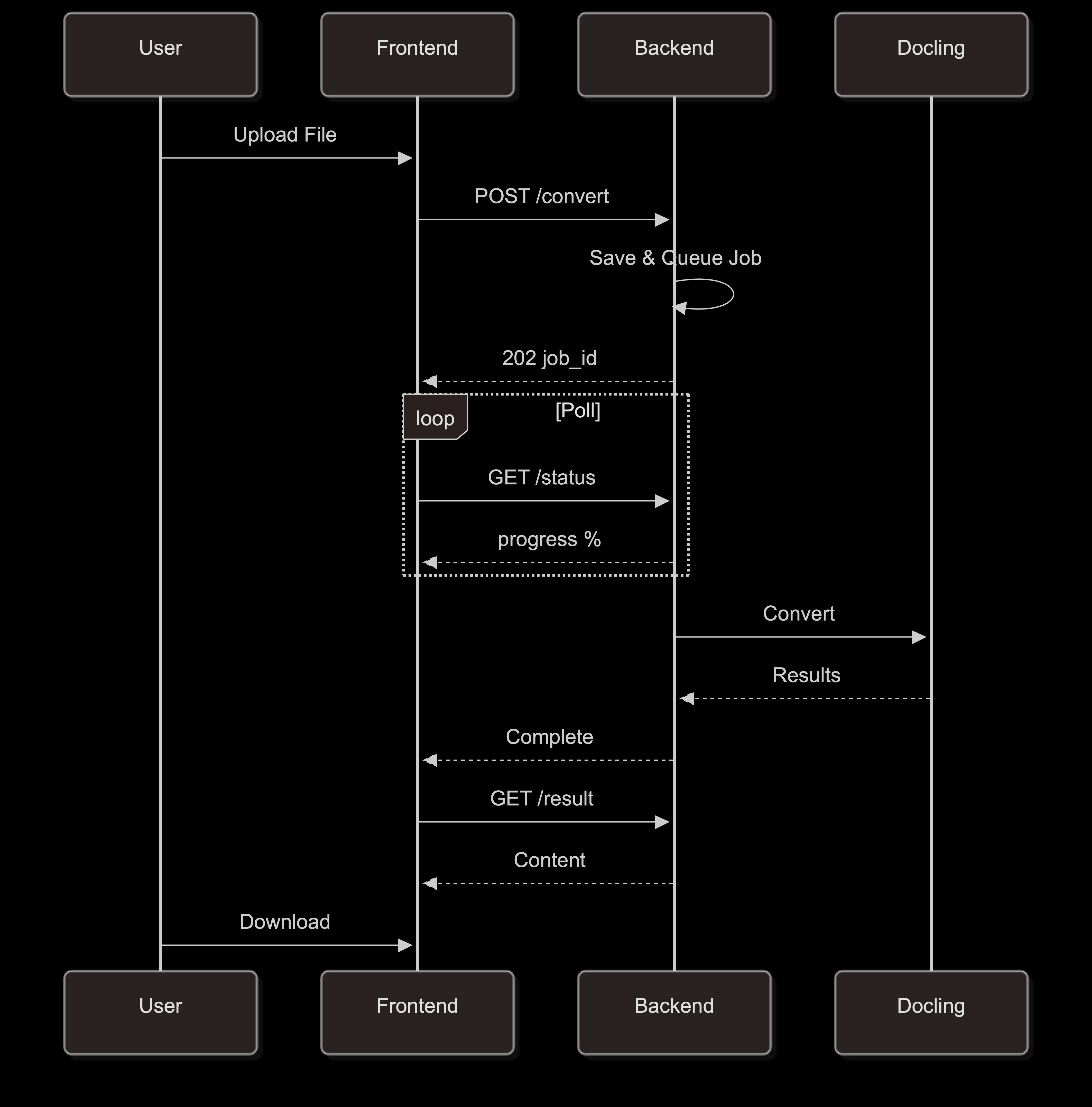
Flux de conversion
sequenceDiagram
    participant U as Utilisateur
    participant F as Frontend
    participant B as Backend
    participant D as Docling

    U->>F: Téléverser un fichier
    F->>B: POST /convert
    B->>B: Enregistrer et mettre en file
    B-->>F: 202 job_id

    loop Interrogation
        F->>B: GET /status
        B-->>F: progression %
    end

    B->>D: Convertir
    D-->>B: Résultats
    B-->>F: Terminé
    F->>B: GET /result
    B-->>F: Contenu
    U->>F: Télécharger
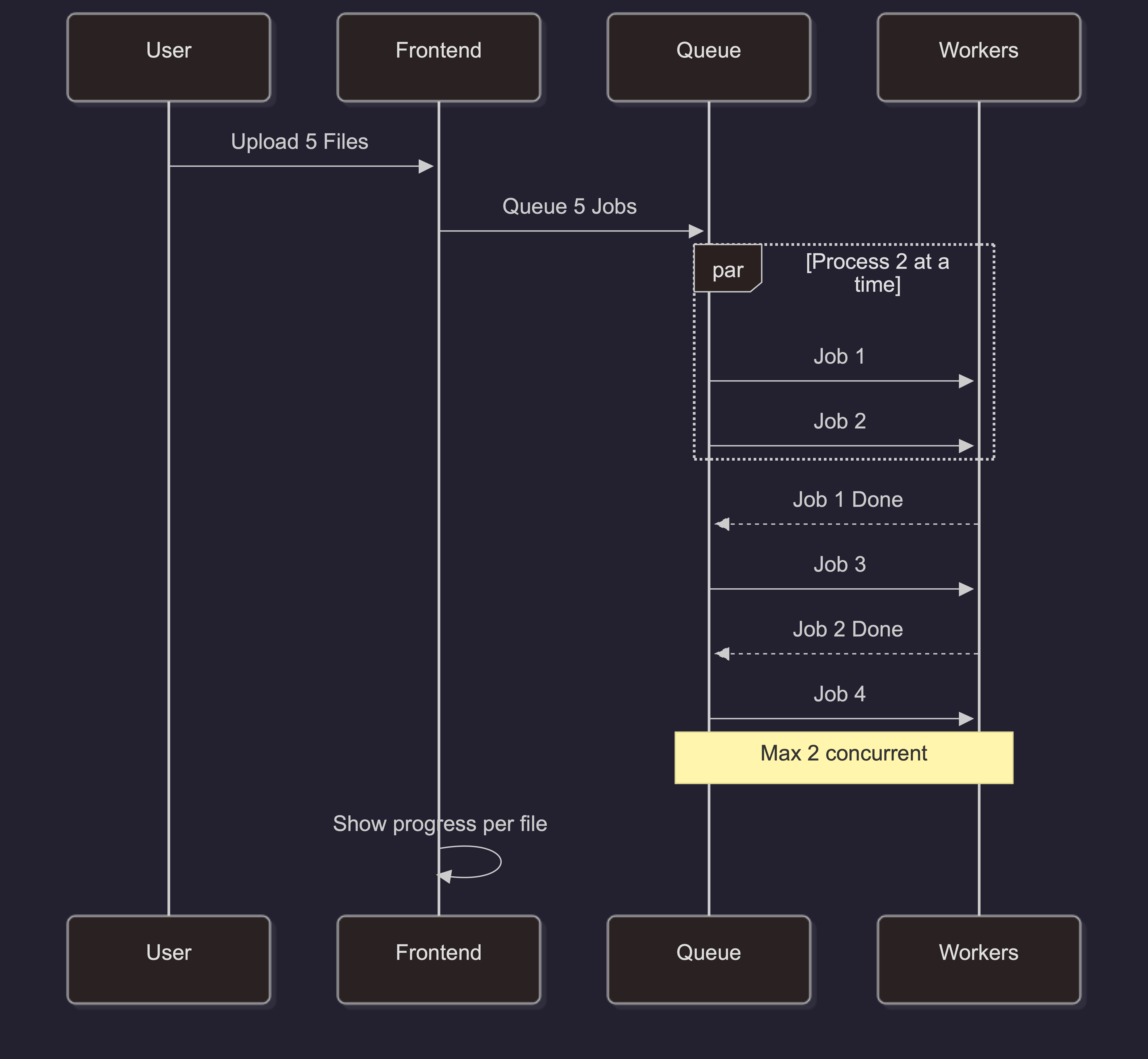
Traitement par lots
sequenceDiagram
    participant U as Utilisateur
    participant F as Frontend
    participant Q as File d’attente
    participant W as Workers

    U->>F: Téléverser 5 fichiers
    F->>Q: Mettre 5 tâches en file

    par Traiter 2 en parallèle
        Q->>W: Job 1
        Q->>W: Job 2
    end

    W-->>Q: Job 1 terminé
    Q->>W: Job 3
    W-->>Q: Job 2 terminé
    Q->>W: Job 4

    Note over Q,W: Max 2 simultanés

    F->>F: Afficher la progression par fichier
Architecture de montée en charge
Pour les déploiements en production à fort trafic :
graph LR
    LB[Équilibreur de charge]

    LB --> B1[Backend 1]
    LB --> B2[Backend 2]
    LB --> B3[Backend 3]

    B1 --> Redis[(Redis Queue)]
    B2 --> Redis
    B3 --> Redis

    B1 --> PG[(PostgreSQL)]
    B2 --> PG
    B3 --> PG

    B1 --> S3[(S3 Storage)]
    B2 --> S3
    B3 --> S3

    style LB fill:#f59e0b,color:#fff
    style Redis fill:#dc2626,color:#fff
    style PG fill:#3b82f6,color:#fff
    style S3 fill:#22c55e,color:#fff
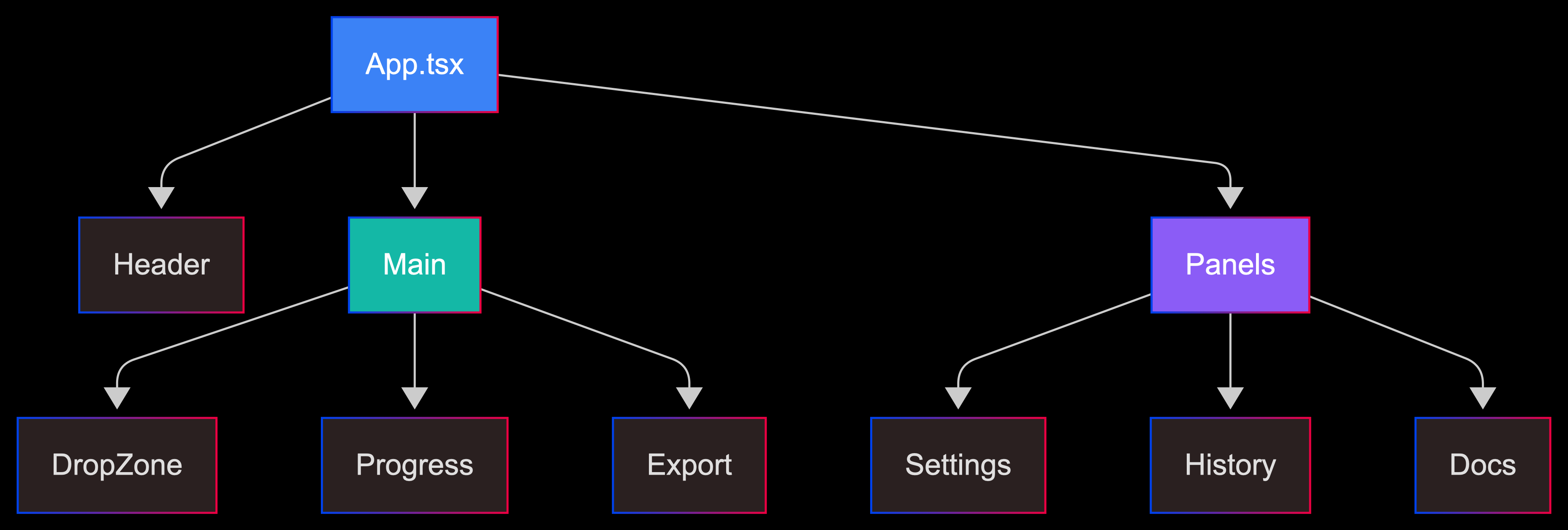
Arbre de composants
graph TD
    App[App.tsx]

    App --> Header[En-tête]
    App --> Main[Zone principale]
    App --> Panels[Panneaux]

    Main --> DropZone[Zone de dépôt]
    Main --> Progress[Progression]
    Main --> Export[Export]

    Panels --> Settings[Paramètres]
    Panels --> History[Historique]
    Panels --> Docs[Documentation]

    style App fill:#3b82f6,color:#fff
    style Main fill:#14b8a6,color:#fff
    style Panels fill:#8b5cf6,color:#fff
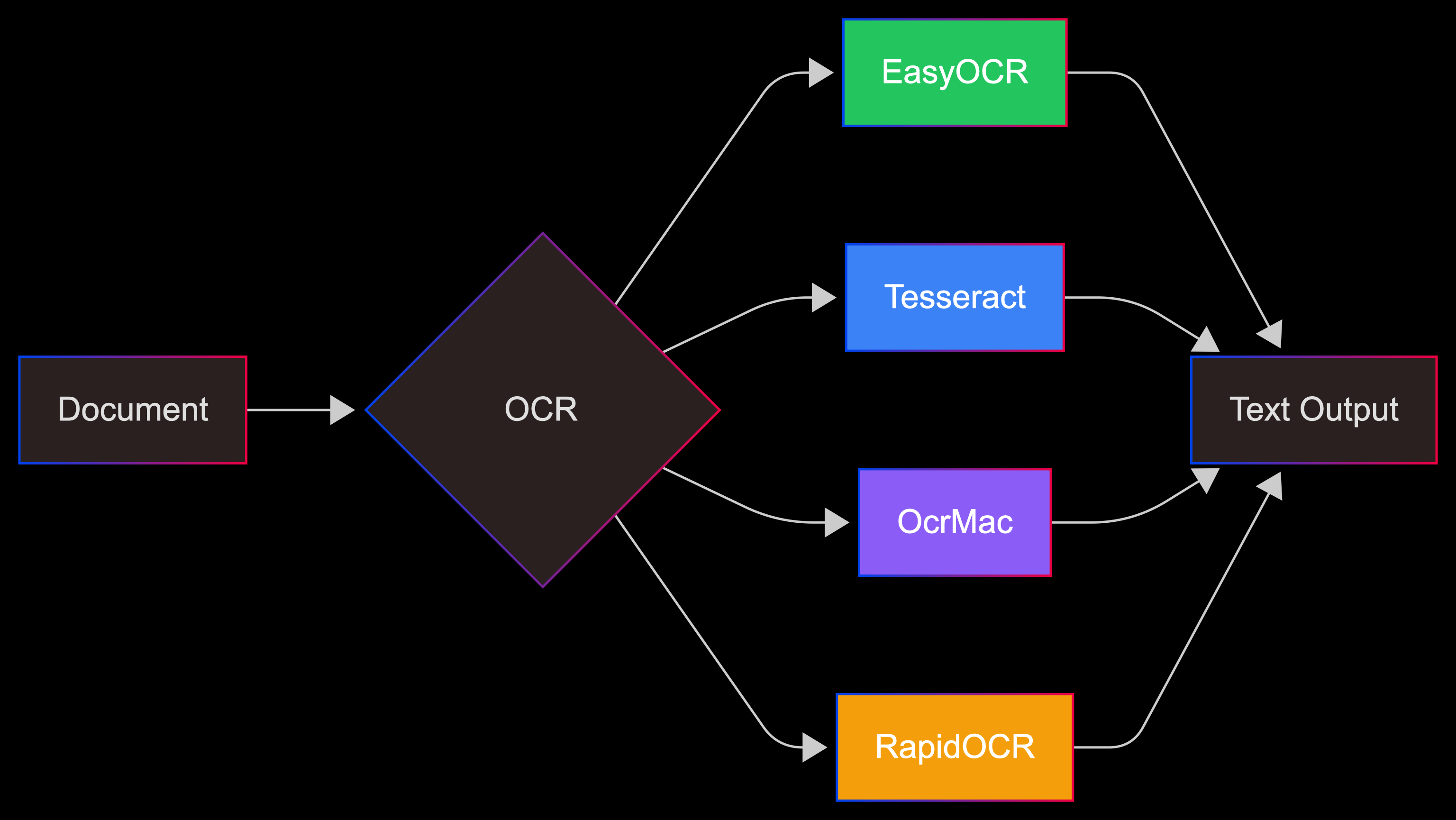
Options OCR
graph LR
    Input[Document] --> OCR{Back-end OCR}

    OCR --> Easy[EasyOCR]
    OCR --> Tess[Tesseract]
    OCR --> Mac[OcrMac]
    OCR --> Rapid[RapidOCR]

    Easy --> Out[Sortie texte]
    Tess --> Out
    Mac --> Out
    Rapid --> Out

    style Easy fill:#22c55e,color:#fff
    style Tess fill:#3b82f6,color:#fff
    style Mac fill:#8b5cf6,color:#fff
    style Rapid fill:#f59e0b,color:#fff
Images statiques des schémas
Pour les environnements sans rendu Mermaid, des images statiques sont disponibles :